Table of Contents
Hardware FAQ
Gamepad, Joystick and Mouse
Links to where to buy are for your convenience and list not every place where they are sold nor is that the intention.
Gamepad
What gamepads work?
Natively
- Turbo 2000 Super Wireless Gamepad V2
- Commodore 64 / VIC-20 Atari 2600 Controller Joystick Up to Jump Map Gamepad
- Atari wired CX78+ Gamepad Controller. - The mini joystick on the D-pad can be removed
- Atari wireless CX78+ Gamepad Controller. It also has an USB dongle for use on PC. - The mini joystick on the D-pad can be removed
- A Sega Master System controller (two button)
- It will work on the C64 and is safe to use. The second button will ground one of the paddle inputs, which does not cause harm as it’s designed to read a voltage input (ground=0V)
- Not yet available but in the works; Protopad from Protovision
Sega Genesis Controller
Do not use a Sega Genesis controller.The plug fits and it works, but the internal wiring differs and will damage your port.
Pin 7 on the Megadrive is the ground, while Pin 7 on the C64 is +5V. So pressing the controller pad would connect 5V to places where it shouldn’t be. There are electronics inside the controller to multiplex the buttons and it is possible that would be damaged too.
Joystick
For information about how the joysticks work in the C64 see Joystick
What joysticks work?
- ArcadeR Joystick
- https://www.commodore.net/product-page/arcader-joystick - A good way to spend your Commodore Coins if you have them (and expire after 3 months)
- The Atari CX40+ Wireless Joystick. Several colour options
- An Immortal Joystick. Build is bomb proof. It comes with the C64 9pin connector so you can get a USB adapter to connect to PC also
- Trooper Premium Controller 2600 from Hyperkin
- Competition Pro from Kempston Micro Electronics is a very well regarded joystick that is not longer in production. Joysticks that look a lot like it do exist.
Mouse
Note: the actual use of a mouse on a C64 is limited to a few programs. Like GEOS and C64OS.
Where can you buy a DB9 compatible mouse ?
There is no known commercially available compatible mouse available. The only options are a legacy mouse from the time period. Or a new mouse in combination with an adapter.
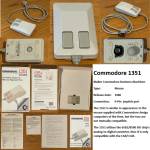

Be aware: some DB9 to USB adapters can support mouse on the Atari but not on the C64 but do support gamepad/joystick on the C64
There is a Micro Tom Bundle DB9 to USB converter & retro ‘tank mouse’ USB mouse. Do not expect this converter too work for USB joystick or gamepad
Paddle
A paddle is a simple control device for use in games: It has a single potentiometer type knob (similar to the volume knob found on e.g. a stereo) which the player uses to move or control something in the game along a seemingly continuous range. (more see Paddle) Youtube video about this type of controller
At present there is no known seller of those new.
Can I use an USB-device?
The only device that just should work is an usb keyboard when plugged in an C64U USB-port. Anything, besides an storage device (like USB-stick) will not work.
Note: Gideon Zweijtzer, who made the Ultimate 64 which is nearly identical to the C64U, wrote about the use of an USB mouse on Facebook 'Not yet implemented'. - So there is potential that it could come in a later firmware update.
Buying and using a DB9-to-USB adapter
Dongles do exist which translate between the DB9 port to usb. If it works you can use an usb mouse, gamepad or joystick.
MouSTer: What can I do with that and where to buy?
The dongle that gives the best hope that it will work is the MouSTer dongle.
With mouSTer it works in GEOS and C64OS with an USB-mouse. Be aware that the mouSTer is a universal USB HID class device to DB9 adapter. It emulaties Atari, Amiga and the Commodore 1351 mouse. And it emulates joysticks and gamepads. The mouSTer is highly configurable via an .INI file.
Micro Tom
Note: the user manual indicaties that this is useful for the Commodore 64/128 for GEOS mouse emulation. And that it should work also for Joysticks and game pads. - When testimonials are found from C64U user that it works and with what this will be updated.
Other DB9-to-USB dongels
- Other dongles:
- Amiga Atari ST C64 USB Mouse & Joystick Adapter
- Does not supports mouse but does some usb gamepads & joysticks with list of known working devices
Sega Mega Drive adapter to DB9
- makes it possible to use Sega controllers, also Bluetooth ones, on the C64
DB9-to-Bluetooth adapter
- joystick adapter for C64. Supports modern controllers with low latency and dual joystick mode.
Build-it-Yourself
Can I make my own C64 to joystick/gamepad/mouse adapter?
While some people sell ready to use adapters you can find the information built your own. This requires that you will need source components and able to put the electronics together. A lot of people do that but it is more difficult than putting a IKEA bokshelft together.
- You could can modify a nearly compatible gamepad to make it safe to use
User port: What is it & how to get it back?
At the C64U is the user port is missing. At it's place are the external usb ports, ethernet port and HDMI-connector.
The user port was to connect external devices such as modems and printers to the Commodore 64. It is possible to get it back with a special expansion module you can buy on the Commodore website and plug it in the available connector for it on the C64U motherboard.
See this FB post for how installing it can look and be done.
A potential use of the user port is is this module to add 2 extra DB9 joystick ports. So that you can play with 4 people on one C64, if the game supports that.
Does it bend? (or flexes)
What editions are affected?
If the problem occurs, it will be with the Starlight edition and probably also the Founders edition. To make the case transparent in these versions, the material is built lighter and the PCB is transparent and more fragile. As such the Basic beige version should be the most solid built version.
How serious is the bending?
Not every example is the same. Some buyers have no complaints about it, and even realize there is some flex when they read about it; though some do have complaints.
How to fix the bending?
It is quite possible that some units were not put together exactly like they should have been with some parts not being not exactly aligned. This could be explained the difference in experience of the person assembling the unit.
As the C64U is very simple to open and there are very few parts, one should be able to fix the issue by realigning the offending parts.
There also have been 3D printed braces made to re-enforce the internal structure.
- Small brace made by Jakub Rzepecki
- I know that there is a 3d print fix for bending keyboard, but for me it's too much print. So I made smaller one, lightweight one - it does not cover the entire keyboard - but it is sufficient to “eliminate” the bending effect - or at least greatly reduce it. The print was designed to use the four built-in screws already present in the C64U, as well as two existing additional holes, into which a screw with a nut can be inserted. The reinforcement does not interfere with the installation of SID chips, even if heat sinks are mounted on them.
What's the SID about?
The C64U comes with software based SID chips, 'UltiSID'. These produce the sound of the C64. These are good but are not able in every situation to produce the authentic sound.
Sockets are available to install hardware SID chips very easily. Configuration options are available in the menu for this.
What is the difference between the 6581 and 8580 SID chips?
The 6581 SID has grittier, more distorted filters. The 8580 in later C64C's sounds cleaner struggles with some filter-heavy music written for the 6581.
Should I install real SID chips? What is that about?
This is a controversial topic.
At the very least try the UltiSID's first. They are good. It is true they can not cope with edge cases. But those are the exceptions. FB post about this
If you look you indeed can find programs that will not work like the should like this one with the UltiSID. The C64U offers you the option to install hardware SID's.
There are the legacy ones from C64. They are literally 'the real deal'. By definition they are old and limited in supply. Their prices have only gone up. If you wish to buy one of those be careful. Broken and especially fake ones are on offer.
There are also new hardware SID's. Those are not the real MOS-chips. They are attempts to create replacements, just like the UliSID is, but with hardware instead with software.
Examples of those new hardware SID's are; ARMSID, SIDKickPico, FPGAsid, BackSID, SwinSID and SIDKick
| Comparing C64U UltiSID versus vintage MOS 6581 | Comparing Ultimate 64 UltiSID versus ARM2SID |
Should after installing real SID chips I change the jumpers SID Mix/P16?
Page 210 of the Manual, #24 explains it. Just insert the SID, they are auto-detected. Just enable it in the menu system and you are off to the races. Don’t change any other settings. Enable = done
If you move the jumpers you will bypass the mixer and UltiSID's… so you only have the sound of the SID sockets. You can in the Menu disable the UltiSID's and enable the hardware SID's. There is no need to switch the jumpers. It's mostly for purists who want to connect it to a setup to get the pure, unaltered sound from the chip.
You lose the option to change what SID's to use with the configuration software if you change that.
Where can I buy SID's?
Please do your research before just buying stuff. - And try the UltraSID's included first.
Have anyone tried sidkick pico and how is it compared to armsid or fpgasid?
FB post about this question See post. People responding thought SIDKick Pro is good.
Internal storage
Do not forget; typical Commodore 64 software is very, very small. Look at the included 'usb cassette' and how much space is still free to guide you how much you need
Storage can be added by means of an SD-card or via the USB-port. The speed of the USB port is about 10 MB/s. The SD card is working in 1-bit SPI mode at 25 Mbps (3.125 MB/s), thus this is more then 3x slower than USB.
Extreem usage test;
- Load 16MB REU file from internal micro SD card (64GB SanDisk XC Ultra Class 10) :17 seconds
- Load the same file from external USB thumb drive (Kingston 64GB USB3) : 3 seconds
Note that 16MB is huge in this context. So while USB is certainly faster as you will typically load much small files the difference will be less extreme.
SD-card
What capacity for the SD-card is supported?
Several owners of the C64U have reported that a 254GB card works. It is reported that Commodore support said the limit is 1TB.
What file system should I use for the SD-card?
How to install it?
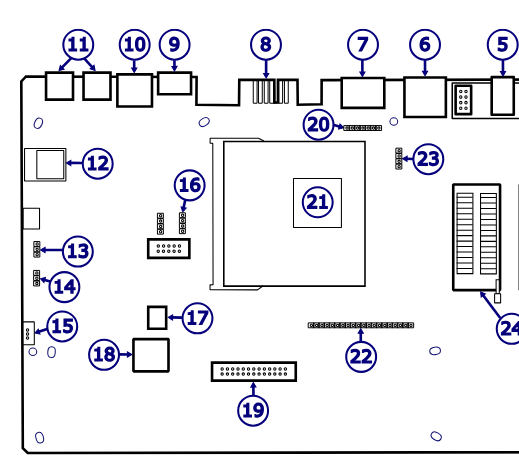
- Remove the 3 screws on the backside
- Carefully open it and unplug the keyboard from the USB-C port and unplug the LED-light. Be careful.
- Install the Micro-SD-card in the slot contact side down / label side facing up
USB-stick
Obviously you can just plug any USB mass storage device in the USB port. Like the included USB-stick (cassette).
Some USB-sticks have a build in light, that you may or may not wish to have it. Especially if you plug it in the internal USB-A port and you have a translucent case.
It would make sense to buy for this purpose a mini USB-A stick. That looks like one of those dongles for a wireless mouse. - This instead of the traditional stick.
Adding an NVMe SSD
Inside the C64U is an internal USB-A port. The top port works. You can buy an NVMe enclosure, put an 2230 M.2. NVMe SSD inside it. And hook it up with an short USB-A to USB-C cable. This way you can have several terabyte of internal storage in your C64U. - Consider using something to secure it inside. Like double sided tape so it will not move around or maybe damage anything.
What are my options to get sound output?
- Internal speaker: not great but better than nothing
- HDMI out: audio is provided if the monitor has speakers
- Line out: there is a 3.5 mm stereo audio jack and Optical S/PDIF. This gives many options. Connecting it to the line-in of a Bluetooth speaker is a simple solution.
- S-video: this port has a video and audio output. Even if you do not use the video you could use the audio of it. You need a cable like this. - Useful to connect it to a audio setup that is using tulip connectors.
How to use the C64U without wall power? Can I make it portable?
FB post about this The C64U is powered with a barreljack connector and needs 12 volt. Some USB battery packs can deliver that power. There exist usb-to-barreljack connectors. - So it is possible to make it 'battery powered'. Make very sure you get the polarity correct.
Can I put the C64U in an original C64 case?
Yes. Or an original replica. The board fits. See also c64u_breadbin_to_64c_case_modification. They C64U main board has a legacy 19-pin connector to connect the original keyboard of an original case.